Step
#1
Check your inbox for our email.
If it's not there check you spam folder.
Step
#2
Open and click to confirm your email address is correct.
Step
#3
You'll be receiving an email with your downloads in a few.
Add Class: fancy--box to Callout module
Here's the CSS, You need to adjust colors to suit your project.
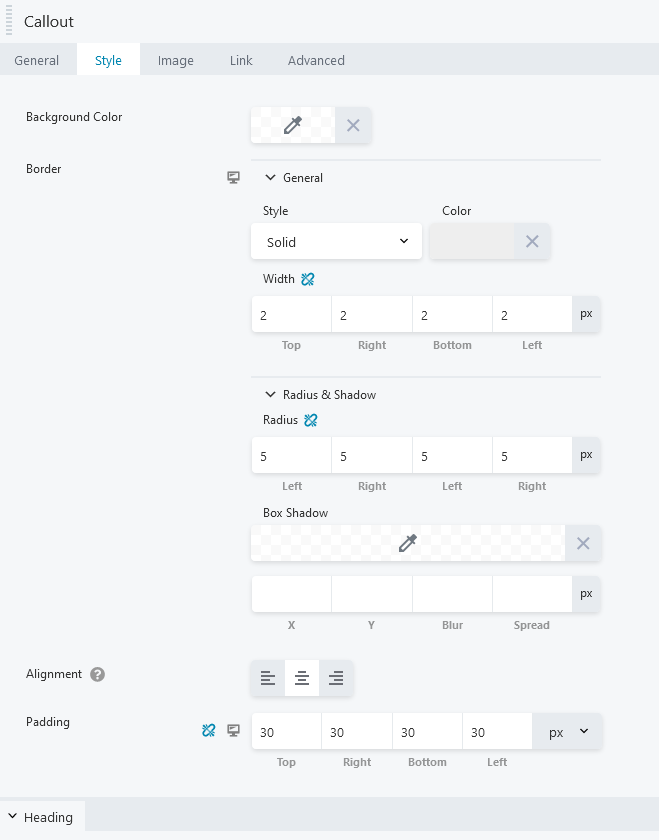
Here's the Callout Style setting I used.
Here's the CSS, You need to adjust colors to suit your project.
.fl-module-callout .fl-module-content {overflow: visible;}

.fancy--box .fl-module-content { border-top:2px solid #e4a743;}

.fancy--box .fl-callout-content {margin-top:-65px;}

.fancy--box .fl-callout-title-text {
    background:#284195; color:#fff; display:inline-flex; padding:0px 5px; border-radius:5px;
}
Here's the Callout Style setting I used.